Stop Leaving Vendor Credits on the Table: How Treez Retail Analytics Helps Dispensaries Capture Every Dollar They’re Owed

Overview: Many dispensaries lose thousands in vendor credits due to manual reconciliation and disconnected reporting. Learn how the Vendor Credit Report in Treez Retail Analytics helps cannabis operators automatically track brand reimbursements, calculate true product cost, and generate export-ready reports for accurate vendor billing.
The Hidden Margin Leak Most Dispensaries Miss
Cannabis retail runs on thin margins. Every basis point matters.
Yet many dispensaries lose thousands of dollars each month not because brands refuse to reimburse them, but because vendor credits are difficult to track, easy to miss, and painful to reconcile manually.
If you are running brand-sponsored promotions such as BOGOs, percentage discounts, bundle deals, or tiered offers, you have already earned that reimbursement. The challenge is turning promotional activity into accurate, defensible vendor invoices.
That is exactly what the Vendor Credit Report in Treez Retail Analytics is built to solve.
What Is a Vendor Credit Report in Cannabis Retail?
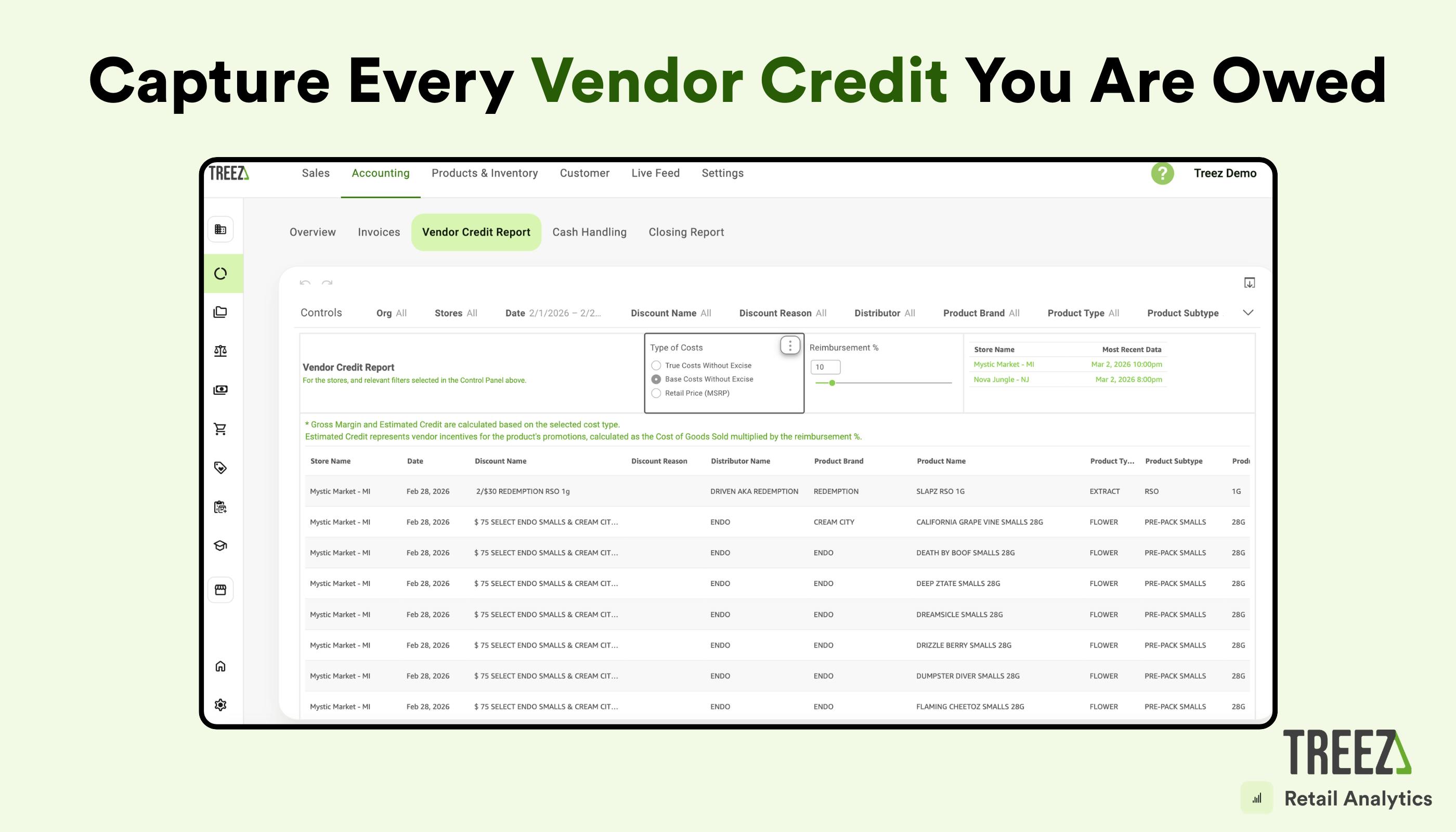
A Vendor Credit Report identifies brand-sponsored discounts, calculates reimbursement amounts based on the true product cost, and generates documentation to accurately invoice vendors.
In cannabis retail, effective vendor credit reporting must connect:
- Transaction-level sales data
- Discount logic
- Product cost including invoice adjustments
- Multi-store reporting visibility
Without POS-integrated retail analytics, this process becomes manual, and margins leak.
What “Good” Vendor Credit Reporting Looks Like
The Vendor Credit Report in Treez Retail Analytics turns vendor credit reconciliation from a spreadsheet task into a repeatable, auditable workflow designed specifically for cannabis retail.
Automatic Credit Identification
Instantly surface every transaction tied to a vendor-sponsored discount. Filter by:
- Brand
- Product or SKU
- Distributor
- Discount name
- Store
- Date range
No exports required. No manual cross-referencing.
Accurate Cost Logic
Choose how credits are calculated:
- Base Cost which reflects invoice intake value
- True Cost which reflects base cost minus invoice discounts
Apply your agreed reimbursement percentage and Retail Analytics performs the calculation automatically. This ensures accurate brand reimbursement reporting and protects margin.
SKU-Level Transparency
See exactly which products, stores, and transactions generated vendor credits. Drill down to individual tickets for audit visibility and dispute resolution.
Export-Ready Reporting
Generate clean, structured reports that vendors can review and approve quickly. Reduce back-and-forth and shorten reimbursement cycles.
Multi-Store Visibility
Track vendor credits across all locations in one centralized dashboard without stitching together store-level spreadsheets.
How Dispensaries Use Vendor Credit Reporting to Protect Margins
Monthly Vendor Credit Reconciliation
Before POS-integrated retail analytics:
- Hours spent filtering POS exports
- Manual discount matching
- Spreadsheet formulas prone to error
With SellTreez POS Retail Analytics:
- Select your date range
- Select your stores
- Choose your cost method
- Set the reimbursement rate
- Export
The process takes minutes instead of hours.
Quarterly Brand and Vendor Reviews
The Vendor Credit Report strengthens vendor negotiations and brand strategy.
Operators use it to:
- Identify which brand partnerships drive profitable volume
- Compare promotional performance to reimbursement agreements
- Spot underperforming discounts that should be renegotiated or discontinued
The outcome is stronger margins and better vendor alignment.
In-Flight Promotion Monitoring
Do not wait until the month-end to identify issues.
Track vendor credit accrual while promotions are running to:
- Catch configuration errors early
- Prevent reimbursement disputes
- Adjust deals mid-campaign if performance falls short
This shifts operators from reactive cleanup to proactive credit management.
Why POS-Integrated Retail Analytics Is Required for Accurate Vendor Credits
Accurate vendor credit reporting depends on real-time access to:
- Transaction-level sales data
- Discount configuration logic
- Product costs and invoice adjustments
- Multi-store reporting
Spreadsheets and standalone BI tools cannot reliably connect these data points.
What makes Treez Retail Analytics Vendor Reporting different:
Native POS Integration
Pulls directly from SellTreez POS transaction data with no middleware and no sync delays.
Built-In Cost Intelligence
Retail Analytics understands invoice discounts, true cost, and how they apply at the SKU level.
Discount Awareness
Because discounts are configured inside SellTreez POS, Retail Analytics distinguishes vendor-funded promotions from house discounts.
Built for Multi-Location Operators
Designed to scale with your retail footprint without breaking reporting integrity.
If your current workflow begins with exporting CSV files, you are not controlling vendor credits. You are exposing margin risk.
Already using SellTreez POS?
The Vendor Credit Report is ready to use inside Retail Analytics. Visit our Help Center article to learn how to access and configure it.
New to Treez? Get Started Today
Not using Treez yet? Schedule a demo to see how POS-integrated retail analytics helps dispensaries capture vendor reimbursements, improve reporting accuracy, and protect margin.